
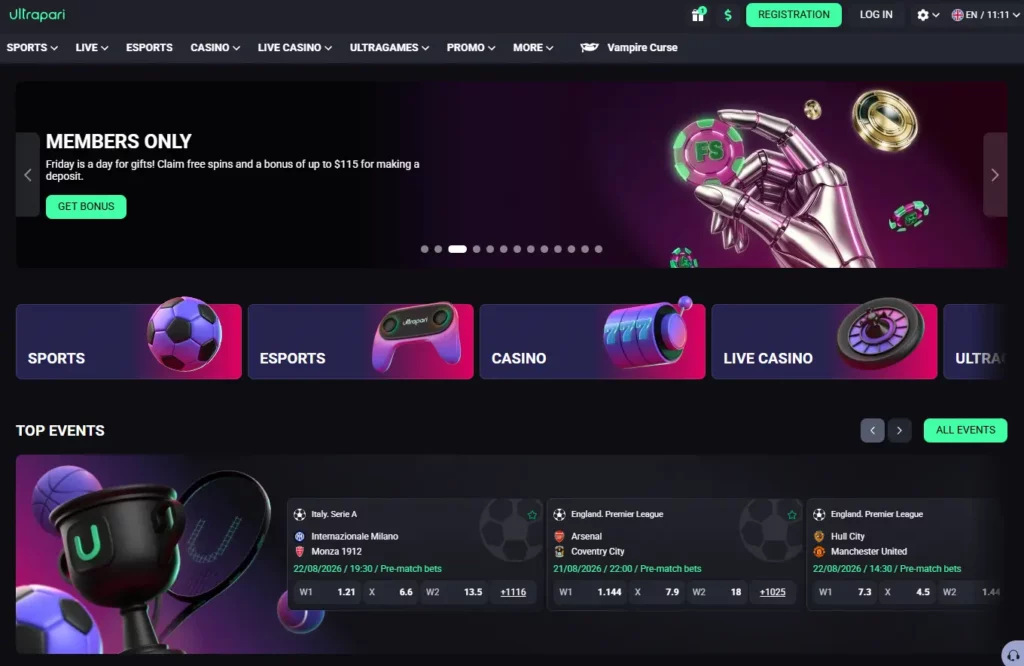
How to Log In to Ultrapari
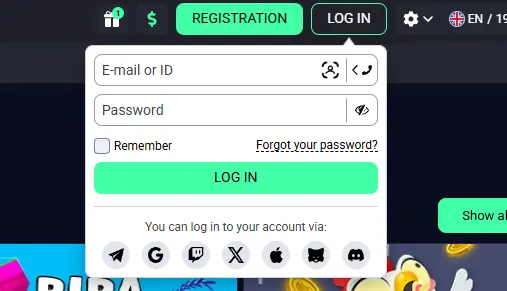
The login process requires the details created during registration. A third-party review describes the sign-in field as accepting either an email address or username together with a password. The exact layout can change when Ultrapari updates its website. Use the verified operator domain rather than a login page received through an advertisement, social media message or unofficial mirror. BookmakerStats lists Ultrapari as an international platform launched in 2025 by Pestus Limited and marks its outbound operator link as verified.
Log In via the Official Website
The website provides the most direct access from a laptop or desktop computer:
- Open the verified Ultrapari website.
- Select the Log In button.
- Enter the registered email or username.
- Type the account password.
- Review the website address.
- Confirm the login request.
After signing in, check that the displayed balance, recent bets and account details belong to the correct profile. Log out immediately if unfamiliar transactions or account changes appear. Avoid saving the password on a computer shared with colleagues, relatives or other household members. Closing the browser window alone may not end an active session.
Log In Using the Ultrapari App
Current independent material describes Ultrapari as fully responsive and states that a separate application is not required for regular mobile use. A confirmed Malaysian listing in Google Play or Apple’s App Store was not identified during the research for this page.
Android and iOS users can therefore log in through the verified mobile website. Enter the same credentials used on desktop; creating a new profile for another device can complicate identity and payment checks.
When an APK is offered through the operator’s verified website, inspect its source before installation. Do not enter credentials into an application downloaded from a file-sharing site, Telegram group or unrelated app-store listing.
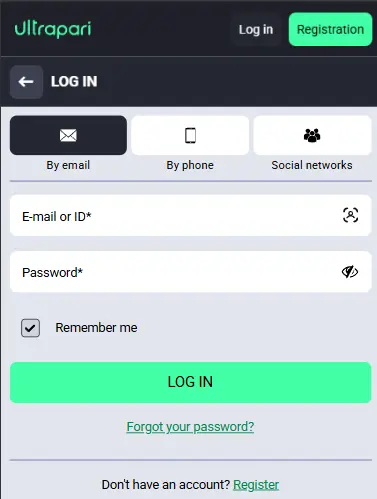
Create an Ultrapari Account
Users without an existing profile must complete registration before accessing personalised casino, sportsbook and cashier functions. The operator is relatively new and has a limited public operating history. Casino Guru’s July 2026 review assigned Ultrapari a Safety Index of 5.8 out of 10, classified as below average, while noting that the database did not yet contain enough user feedback to establish a broad player record.
Registration Process
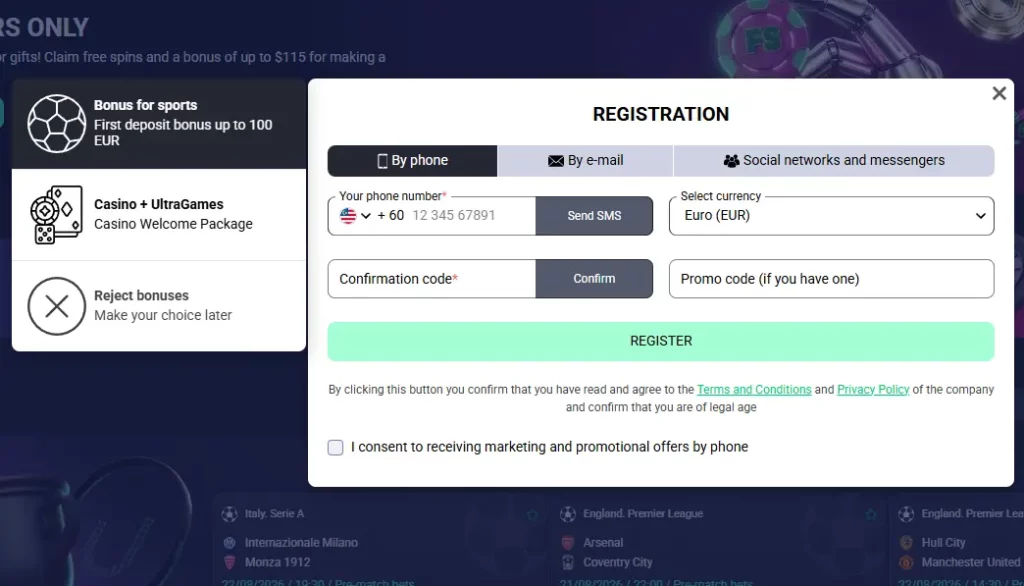
One current third-party review describes registration as email-based with an OTP confirmation. The fields shown to an individual user may vary according to location, currency and the version of the registration form. A typical registration process is:
- Open the verified registration page.
- Enter a working email address or phone number.
- Create a unique password.
- Select the requested country and currency.
- Confirm the verification code.
- Accept the applicable terms.
All personal information should match official documents. Entering an invented name, incorrect date of birth or another person’s contact details can create problems during verification and withdrawals. Before submitting the form, read the regional restrictions and confirm whether accounts from Malaysia are currently accepted. BookmakerStats advises users to verify country availability and regional KYC requirements directly with the operator.
Account Verification
Verification confirms that the profile belongs to the person using it. It may be requested during registration, before the first withdrawal or after unusual account activity. A third-party Ultrapari review reports that verification may involve:
| Verification Item | Purpose |
|---|---|
| Passport or Identity Card | Confirms the account holder’s name, photograph and date of birth. |
| Proof of Address | Confirms the registered residential address. |
| Bank Statement or Payment Evidence | Verifies ownership of the payment method linked to the account. |
| Additional Account Check | Resolves discrepancies, unusual activity or mismatched account information. |
The exact document list should be taken from the verification page or a direct support request. The third-party source reports ID, address and bank documentation before a first withdrawal, but individual requirements can differ. Upload clear images showing all requested details. Edited, cropped or unreadable files can delay approval. Sensitive documents should be submitted only through the authenticated account area rather than ordinary chat messages or unofficial email addresses.
Recover Your Login Credentials
Account recovery should begin from the verified login page. Do not use a password-reset link received unexpectedly, especially when the message creates urgency or asks for payment information. The recovery process commonly relies on the registered email address or phone number. Users who have lost access to both may need to prove ownership through customer support.
Reset Your Password
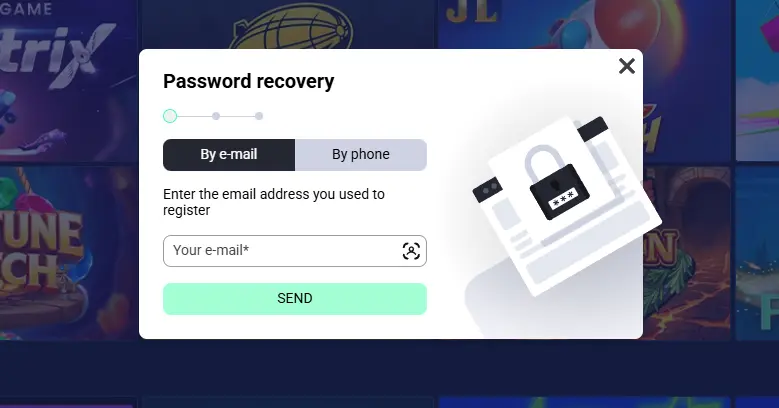
A Forgotten Password option is reported beside the Ultrapari login form. It should send recovery instructions to the contact method connected to the profile. To reset the password:
- Open the official login page.
- Select Forgotten Password.
- Enter the registered email or username.
- Check the inbox and spam folder.
- Open the latest recovery message.
- Set a new unique password.
Do not reuse the previous password with a small change such as adding one number. CyberSecurity Malaysia recommends avoiding password reuse, changing credentials after suspected exposure and using a reputable password manager instead of storing sensitive logins carelessly in a browser. A genuine support agent should not require the user to disclose the full current password.
Contact Customer Support
Support may need to intervene when the recovery email never arrives, the registered contact method is no longer accessible or the account has been restricted. Provide a concise explanation containing:
- The registered name.
- The email or phone number.
- The approximate last successful login.
- The displayed error message.
- The device and browser used.
- The recovery steps already attempted.
Do not include passwords, card PINs or one-time authentication codes. Support may ask for identity verification, but sensitive files should be uploaded only through a secure channel linked to the account.
Common Login Issues
A failed login does not always mean the account has been closed. Incorrect credentials, browser data, connection problems and security restrictions can produce similar symptoms.
Incorrect Username or Password
Check Caps Lock, keyboard language and automatic text correction. Mobile keyboards can add a space after an email address or replace characters without making the change obvious.
Enter the credentials manually rather than repeatedly pasting the same text. When several attempts fail, use password recovery instead of continuing to guess.
Never test login details on different websites that claim to be alternative Ultrapari domains. Reusing the credentials on a phishing page can expose both the username and password.
Locked or Restricted Account
An account can be restricted after suspicious login activity, incomplete verification, mismatched payment information or a terms review. The exact reason should be shown in the account notice or explained by support.
Do not create another account to bypass the restriction. A duplicate profile can make the original case more difficult to resolve.
Prepare the account email, error screenshot and any requested verification documents. Ask support to state what action is required and whether access to withdrawals remains available during the review.
Browser and App Troubleshooting
Old cache files or cookies can interfere with a login page after a website update. Reload the page first, then restart the browser. If the issue continues, clear the site’s cache and cookies or try a different updated browser.
Google notes that clearing browser data can resolve loading and formatting problems, although users may need to sign in again afterwards. Before doing so, make sure your password and account recovery details are available.
On iPhone devices, Apple explains that blocking all cookies may prevent a website from accepting the correct username and password. If the problem persists, review the browser settings or contact support for further assistance.
Account Security
An Ultrapari account can contain personal details, payment history, betting records and an available balance. Protecting the login is therefore part of protecting the user’s financial information. CyberSecurity Malaysia warns that stolen usernames, browser data, cookies and session tokens can be used for credential-stuffing attacks, phishing, identity theft and financial fraud.
Protect Your Login Information
Create a password used only for this account. A longer random password stored in a reputable password manager is safer than a familiar word reused across betting, email and banking services. Useful account protections include:
- A unique password.
- Multi-factor authentication when available.
- A locked personal device.
- Current system and browser updates.
- Regular session reviews.
- Immediate action after suspicious activity.
Do not share an account with another person. Even when the other user is trusted, shared access can create verification disputes and make it harder to identify unauthorised activity.
Safe Login Practices
Type the verified address into the browser or use a trusted bookmark. Be cautious with messages claiming that an account will be closed unless the user signs in immediately. CyberSecurity Malaysia recommends avoiding public or unsecured Wi-Fi for sensitive financial access, keeping devices patched and monitoring accounts for suspicious activity. After logging in on a temporary device:
- Review the active session.
- Avoid saving the password.
- Do not enable “stay logged in.”
- Log out from the account menu.
- Close the browser.
- Remove downloaded documents.
Change the password immediately if credentials were entered on a suspicious page.
Privacy & Data Protection
Registration and verification may require personal data such as a name, date of birth, address, contact details and identity documents. Malaysia’s Personal Data Protection Commissioner administers and enforces the Personal Data Protection Act 2010 for personal data processed in commercial transactions. However, the protections and complaint routes applicable to an overseas gambling operator may depend on where the company and its data systems are based. Before uploading documents, review the platform’s privacy notice for information about:
| Privacy Detail | What to Check |
|---|---|
| Data Collected | What personal, contact and payment information is collected. |
| Purpose | How the data is used for verification, payments, security and legal compliance. |
| Storage | How long the information is retained and what security measures protect it. |
| Sharing | Whether data is shared with payment providers, verification services or other authorised partners. |
| User Requests | How to request access to, correction or deletion of personal information. |
Avoid sending more information than requested. Hide nothing required for verification, but do not add unrelated financial records or account passwords.
Manage Your Ultrapari Account
After login, the profile area should provide access to personal information, transaction records, security settings and verification status. Changes involving a legal name, date of birth or country may require support assistance rather than a simple edit. This prevents an account from being transferred to another person.
Update Personal Information
Review the registered details before making a deposit or withdrawal. The account name should match the owner of the selected card, bank account or e-wallet. Minor fields such as a telephone number or communication preference may be editable from the profile. For protected details, prepare a clear explanation and supporting document. Do not replace the registered information with another person’s details. Contact support when the original registration contained a genuine spelling mistake.
Change Your Password
Use the security or profile section when the current password is known. The new password should not duplicate an email, online banking or social-media credential. Change it after:
- A suspicious login notification.
- Accidental disclosure.
- Use on a phishing page.
- Malware detection.
- Loss of a trusted device.
- Unrecognised account activity.
CyberSecurity Malaysia recommends logging out of active sessions and revoking unfamiliar device access when credentials may have been exposed.
Complete Account Verification
Finishing verification early can reduce delays when account functions later require an identity check. A third-party review reports that Ultrapari may request an identity document, proof of address and bank evidence before a first withdrawal.
Use current documents and follow the stated file requirements. Check that:
- The full document is visible.
- The image is clear.
- The details match the account.
- The document has not expired.
- The file type is accepted.
- The upload is made securely.
Verification does not guarantee an instant withdrawal, since payment ownership, bonus conditions and account activity may still require review.
Log In on Mobile Devices
The Ultrapari website is reported to use a responsive interface that works without a dedicated application. The same profile can therefore be accessed from a desktop browser, Android device, iPhone or tablet. Use only one account across devices. Balances, bets and verification status should remain attached to that profile.
Android App Login
A verified Malaysian Google Play listing was not confirmed during this review. The safest default is to open the verified operator website in an updated Android browser. To log in:
- Open Chrome or another current browser.
- Enter the verified website address.
- Select Log In.
- Enter the registered credentials.
- Confirm the account information.
- Add a Home Screen shortcut if needed.
When an official APK is offered through the verified site, it should use the same account credentials. Do not install an unrelated application with a similar name. If the browser login stops working after an update, clearing the relevant cache and cookies may fix the page, although it will normally remove that website’s stored session.
iPhone & Mobile Browser Access
Open the verified site in Safari and sign in with the existing email or username and password. A native Malaysian iOS application could not be independently confirmed. Cookies must remain available for the login session. Apple notes that blocking all cookies can prevent users from signing in even when the supplied credentials are correct. A website shortcut can be added to the Home Screen for quicker access, but it remains browser-based and should not be confused with a separately verified App Store application.
Customer Support for Login Assistance
Support is most useful when automated recovery does not solve the issue. Keep the request focused and provide the exact error rather than sending several separate messages about the same case. Casino Guru confirms that English-language live chat is reported as available 24/7. It also notes that chat support is not provided in every language displayed on the website.
24/7 Live Chat
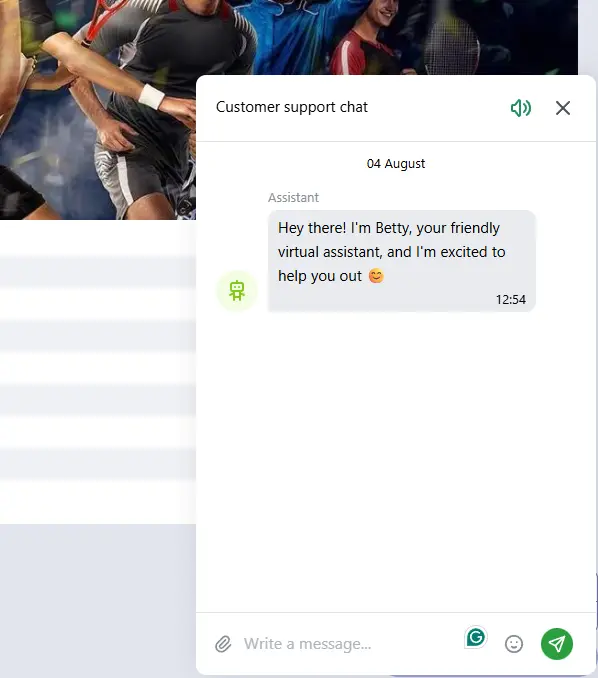
Live chat is the clearest reported channel for urgent login problems. Casino Guru lists English live chat as available around the clock, while another review also reports 24/7 access. Use chat to:
- Report a restricted account.
- Check recovery-message delivery.
- Ask about verification.
- Report suspicious access.
- Confirm the correct recovery channel.
- Request escalation of an unresolved case.
Do not paste a password, authentication code or complete card information into the chat window.
Email Support
A third-party review reports email or ticket support for more complex cases, but a clearly verified public customer-service email address for the main Ultrapari platform was not confirmed during this research. Use the email address or ticket form displayed inside the authenticated Help or Contact section. Do not confuse the main customer service with the separate Ultrapari Partners affiliate programme, which has its own login and support details. An email request should contain the registered contact, a brief issue description and any case number already issued by live chat.
Help Centre
A third-party assessment reports searchable FAQ or help material alongside chat and ticket support. The available topics and page layout may vary by language. Look for sections related to:
| Help Topic | Suitable Use |
|---|---|
| Login and Password | Recovering account access or resetting login credentials |
| Registration | Resolving issues during new account creation |
| Verification | Checking document requirements and identity verification status |
| Payments | Assistance with deposits, withdrawals or payment-related questions |
| Security | Reporting suspicious activity or securing the account |
| Account Management | Updating personal information or managing account settings |
When the Help Centre does not answer the exact question, quote the relevant error message to live chat rather than repeatedly attempting the same action.
Frequently Asked Questions
How do I log in to my Ultrapari account?
Open the verified Ultrapari website, select Log In, enter the registered email address or username and type the password. The current login interface has been described as accepting an email or username with a password.
What should I do if I forget my password?
Select Forgotten Password on the login page and follow the instructions sent to the registered contact method. Check the spam folder and confirm that the request was made through the verified website.
Why is my account locked?
Possible reasons include suspicious login attempts, incomplete verification, incorrect account information or a security review. Contact live chat and provide the exact restriction message. Do not open a second account to bypass the lock.
Can I log in using the mobile app?
Ultrapari can be accessed through an Android or iOS browser using the same credentials as the desktop version. Independent material describes the site as fully responsive and says that no separate application is needed, while a verified Malaysian app-store listing was not confirmed.
How can I contact Ultrapari customer support?
English live chat is reported as available 24/7. Email or ticket support is also reported by a third-party review, but users should obtain the current address or form from the authenticated Contact section rather than trusting an unverified address.